Your patients' before and afters, across their whole treatment journey.
B&A Pro pairs the B&A app your patients use at home with a portal for your clinic. They take guided photos, B&A reminds them when each set is due, and you see every before and after, not just the ones taken in clinic.
Download the app to try it. Free for 7 days

Why clinics use it
Reviews start with photos, not memory
You both see the change, from photos taken the same way each time.
Consistent records without a studio
The camera guide holds every photo to the same distance, angle and position.
Patients come back on time
Treatment-relevant push notifications tell them when each set of photos is due.
Check-ins between visits
Patients take their photos at home on the right day, and you see them when they share.
Your clinic's name in their app
In Settings, linked patients see “B&A provided courtesy of” with your clinic's name.
Private and logged
Patients choose what to share. Staff can view only, and every view is recorded.
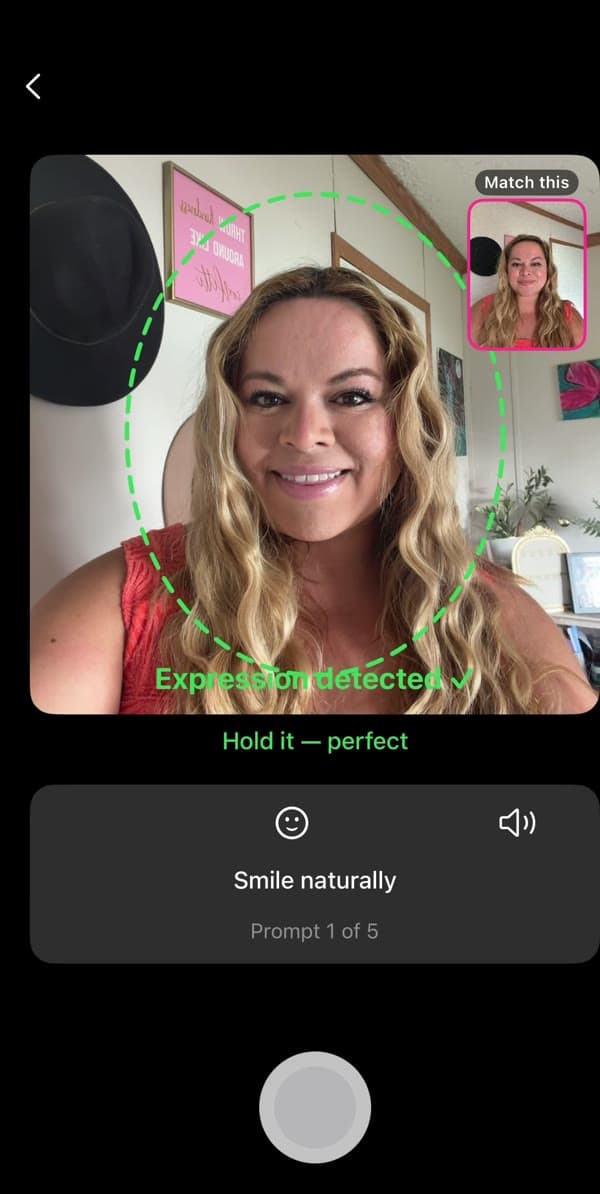
For your patients: the B&A app
The camera guide lines them up the same way every time, at home.
For your clinic: the portal
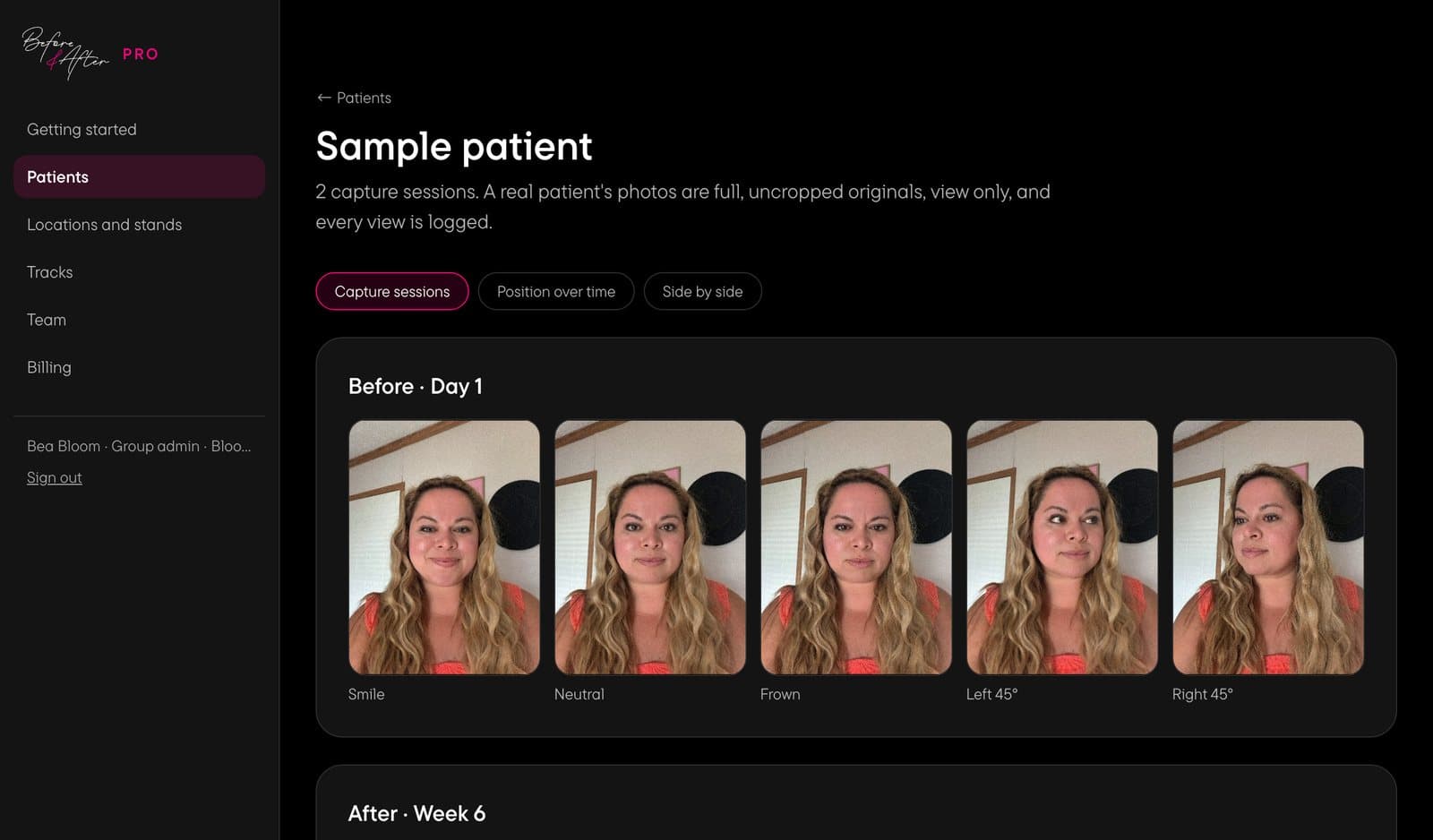
The photos each patient shares with you, by position and by session.
How it works
- 1
Sign up for $1
Then take the walkthrough and set up your staff and locations.
- 2
Your stand arrives
An NFC stand for your desk, with your clinic's QR code on it.
- 3
A patient links to you
They tap the stand or scan your QR, agree to share their photos with you, and they're linked.
- 4
Choose their notification schedule
Enter the treatment date, and B&A sends a notification on their phone when each set is due.
- 5
Open the portal
Every position, every session, side by side.
Treatment-relevant push notifications
Choose a notification schedule for each treatment.
- Fine lines & wrinkles
- Volume & structure
- Skin & texture
- Long-term plan: 6 months
- Long-term plan: 12 months
Change the days, or add your own.
What you see





A capture session
All five positions, full and uncropped, with the date.
One position over time
The same pose from every session, in date order.
Two sessions compared
Any two sessions of the same pose, next to each other.
View only, and logged
No download or export, and every view is recorded with who looked and when.
Two ways to bring B&A into your clinic
Recommend the app
Patients download B&A and pay for their own plan. They track their own results, and you don't see their photos.
Costs you nothing
Launch B&A Pro
A fully connected journey from your clinic. B&A is free for linked patients, you set their notification schedule, and you see every before and after.
A$4.99 a month for each linked patient
Pricing
- Today
- A$1
- Your account, walkthrough and set-up
- After 7 days
- A$149
- Your clinic goes live and your stand is posted. Cancel before then and it's never charged
- Each linked patient
- A$4.99 /mo
- B&A is free for them
For example, 20 linked patients is A$99.80 a month. Billed in AUD, plus local tax. Your local currency is shown as a guide.
Your marketing kit
Once you're live, upload your logo and download reels, social posts, a patient email and a reception poster, all with your logo and your clinic link.
Questions
Do patients have to pay?
Not if they link to your clinic. Every patient who links and agrees to share their photos with you gets B&A free, and you pay A$4.99 a month for them. If you'd rather not pay, recommend B&A instead: patients download it and pay for their own plan, which starts with a free 7-day trial, and they aren't linked to your clinic.
Who owns the photos?
Your patients do. Their photos stay in their B&A account, and they choose which collections your clinic can see. Under the data processing agreement you accept at sign-up, your clinic controls the data it receives and B&A processes it for you.
Can staff download images?
No. Photos are view only in the portal, with no download, export or right-click save. Every view is logged with who looked and when, and group admins can see that log.
How do reminders work?
Choose a notification schedule for each patient and enter their treatment date. B&A sends them a notification on their phone each time their photos are due, or an email if they've turned notifications off. You start with paths for fine lines and wrinkles, volume and structure, skin and texture, and 6 and 12 month plans, and you can change the days or add your own.
Will I know when a patient links?
Yes. Every group admin gets an email for each new patient, with your next bill. You can set an alert for when more patients link in a month than you expect, and reissue your clinic code at any time.
What happens if a patient disconnects?
Your clinic stops seeing their photos and stops sending reminders straight away. B&A stays free for them to the end of that billing month, then they come off your bill. They keep their account and every photo, and we email them how to keep going with B&A.
Which countries is B&A Pro available in?
Every country B&A is listed in, including Australia, the UK, New Zealand, the US and Canada. Not the EU yet. Everything is billed in AUD, shown in your local currency as a guide, plus local tax.
How long does set-up take?
Sign-up takes a few minutes, then the portal walks you through a short set-up checklist: staff, locations, your stand address and push notifications. You have 7 days to finish it before your clinic code goes live and your stand is posted.
Can I cancel?
Yes. Cancel in the first 7 days and you won't be charged the A$149. After that, disconnect any patient at any time, or cancel B&A Pro from your Account page. Patients stay on your bill to the end of that billing month, and keep their B&A account and photos.
Do you help us tell our patients?
Yes. Once your clinic is live, upload your logo and download reels, social posts, a patient email and a reception poster, all with your logo and your clinic link.
Set up your clinic
B&A is available in the UK, Australia, New Zealand, the US, Canada and more. Not the EU yet.
Questions? WhatsApp 0413 653 028 or email [email protected].